
Ubuntu Installation#
Installation Guide for Ubuntu 24.04. Covering installing ROS 2, PX4-Autopilot, Gazebo, and the ESP-IDF toolchain.
Clone The Repository#
git clone --recurse-submodules https://github.com/pennaerial/monorepo.git
Note
the --recurse-submodules flag automatically clones all of monorepo’s submodules.
Note
It is recommended to clone this in your home directory, but any directory will work.
PX4 Installation#
PennAiR maintains its own version of PX4-Autopilot, forked from its 1.17 release. The following instructions are based off of the official PX4-Autopilot documentation.
Install PX4-Autopilot Developer Toolchain#
First, go to the cloned PX4-Autopilot submodule within monorepo.
cd monorepo/PX4-Autopilot
Run the
ubuntu.shinstallation script. This installs the Gazebo Simulator (Gazebo Harmonic) and the NuttX build toolchain.
bash Tools/setup/ubuntu.sh
Restart the computer on completion, and resume on the next step, Build PX4 Software.
Build and Running PX4 Software#
Navigate into the PX4-Autopilot directory and run the following build command. It will build the software-in-the-loop (SITL) target for PX4.
make px4_sitl
Download QGroundControl here. PX4 needs a connection to a Ground Control Station by default, or else the vehicle won’t arm.
Start QGC. Then, run the command to start the Gazebo Simulator with an X500 model.
make px4_sitl gz_x500
To takeoff, run the following command in the same terminal:
commander takeoff
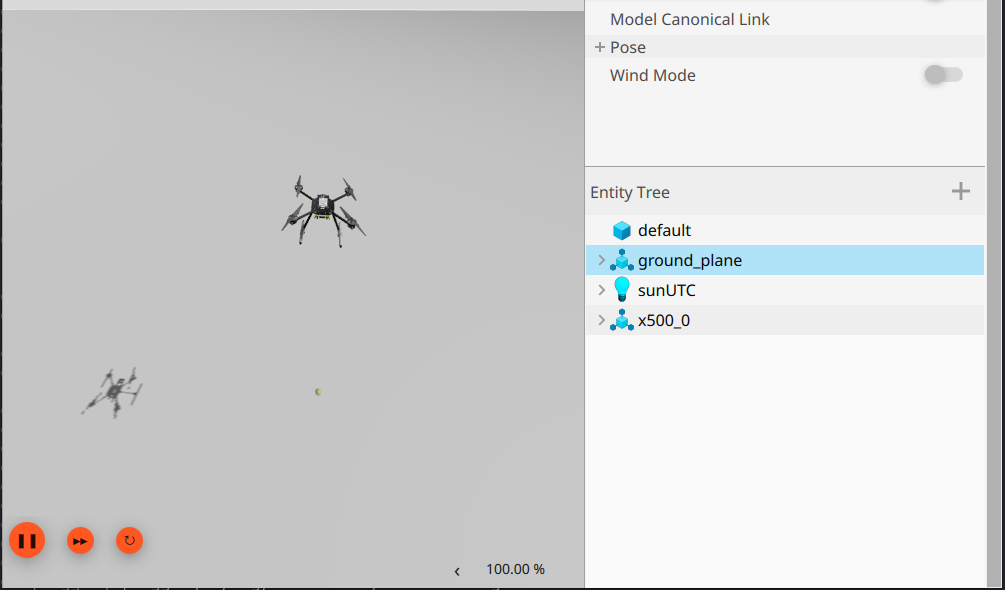
From there, you should be able to control the drone manually using QGC.
Press Ctrl-C to stop the PX4 and Gazebo instance.
ROS 2 Jazzy Binary Installation#
We officially support the ROS 2 Jazzy distribution. Steps for installing the binaries can be found on the official ROS 2 docs.
Note
Make sure to follow the Install development tools (optional) section, and also to do the Desktop Install, not the base install.
Then, navigate to the root of our ROS workspace, initialize and update rosdep, and install all listed rosdeps.
cd ros_ws # root of ros workspace
sudo rosdep init
rosdep update
rosdep install -r -i -y --rosdistro jazzy --from-paths src
Note
rosdeps installs all listed ROS packages (e.g. ros-jazzy-ros-gz) and external libraries (e.g. python3-opencv) using apt in our package.xml files. For more information about rosdep, ROS’s dependency management utility, go here.
Install Remaining System Dependencies#
monorepo maintains a list of python packages, apt packages, and global npm packages that are
required on top of the ROS deps and PX4 deps. Python dependencies can be found in pyproject.toml and
the apt and npm globals can be found in ci/ci.conf
Python Dependencies#
Install uv:
curl -LsSf https://astral.sh/uv/install.sh | sh
echo 'export PATH="$HOME/.local/bin:$PATH"' >> ~/.bashrc
source ~/.bashrc
Confirm uv install: uv --version
From monorepo root:
sudo $(which uv) pip install --system --break-system-packages -r pyproject.toml --group dev
Note
The above command installs the listed dependencies and the dev dependency group.
Unlike traditional uv/pip usage that uses a virtual environment, ROS setups use system wide packages
which doesn’t work too well with venvs.
APT Packages#
From monorepo root:
source dev_env.sh # exports necessary environment variables
source ci/ci.conf
./ci/apt_sources.sh # adds any external apt sources
echo ${APT_PACKAGES[@]} # prints out the entire bash array defined in ci.conf
sudo apt update
sudo apt install ${APT_PACKAGES[@]}
Build the Dependencies Submodule#
monorepo also needs 3rd party dependencies that need to be built from source. We maintain a submodule, called Dependencies that contains all of these packages (more submodules) and a script to build all of them.
Run the install script:
Warning
Due to a gradle incompatiability, ensure you are on Java 17 or Java 11 before running the below. You can do the following to switch:
sudo apt update
sudo apt install openjdk-17-jdk
sudo update-alternatives --config java
Follow the command line prompt to switch to the correct version of Java, then run the above again.
# from monorepo root:
source dev_env.sh # exports environment variables that the build_all.sh script needs
./Dependencies/build_all.sh
Note
Dependencies contains what we call 3rd-party submodules, which is a submodule that PennAiR does not maintain. The Dependencies submodule is called a managed submodule since PennAiR owns and maintains the repo. (It just contains 3rd-party submodules.) The PX4-Autopilot submodule is also a managed submodule.
Note
3rd party ROS packages that we build from source do not go in Dependencies, but are linked in our ROS workspace.
Build and run the ROS workspace#
source ROS:
source /opt/ros/jazzy/setup.bash
navigate to ROS workspace and build:
# from monorepo root
cd ros_ws
colcon build
source local install and run basic UAV mission.
# dev_env.sh sets up environment variables necessary to run uav_sitl.launch.py
source ../../dev_env.sh  # path is monorepo/dev_env.sh.
source install/setup.bash
ros2 launch uav uav_sitl.launch.py
Install ESP-IDF Toolchain#
Verify that eim was correctly installed:
eim --version
Install the ESP-IDF toolchain from our eim_config.toml installation file. Make sure you are in monorepo’s root directory.
eim install --config payload_controller/eim_config.toml
Setup direnv
sudo apt update
sudo apt install direnv

echo 'eval "$(direnv hook bash)"' >> ~/.bashrc # run this once
source ~/.bashrc

cd payload_controller
direnv allow # tell direnv to trust the .envrc in payload_controller
Note
This allows automatic environment sourcing upon entering directories with .envrc files
Verify that builds for both
linuxandesp32s3targets work
make linux
make esp32s3
Note
The Makefile that define these commands is just a light wrapper around idf.py build commands
Setting Up Shell Dotfile (.bashrc)#
monorepo relies on setting up the correct environment variables to work properly, found in dev_env.sh. It is highly recommended
to add the following line to your ~/.bashrc or whatever terminal dotfile you use.
source /path/to/monorepo/dev_env.sh
replace the /path/to with the actual path to monorepo. Make sure it is an absolute path.
Re-source the dotfile and verify that the environment variables are working:
source ~/.bashrc
env | grep PENNAIR